
woensdag 14 augustus 2013
Look for sample projects with All-in-one Code Framework Browser.
A very nice app to easily browse and download sample projects.
 Download it at Codeplex.

woensdag 24 juli 2013
How to make a webpage read-only (disable input) with jQuery.
$("input:button").attr("disabled", true);  // Disables all buttons
$("input:text").attr("disabled", true);
$("input:checkbox").attr("disabled", true);
$('#myCustomElement').attr("disabled", true);
dinsdag 14 mei 2013
Very usefull plugin for KnockoutJS
Map that plain JavaScript object into a view model with the appropriate observables!
More info : http://knockoutjs.com/documentation/plugins-mapping.html
Download : https://github.com/SteveSanderson/knockout.mapping/tree/master/build/output
Add option to html dropdownlist with jQuery
$('#dropdownId').append($('<option>', {
                    value: value,
                    text: text ,
                    selected: true
}));

// Not selected option

$('#dropdownId').append($('<option>', {
                    value: value,
                    text: text
}));
Set a html checkbox to indeterminate state
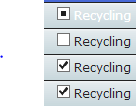
var checkbox = document.getElementById('myCheckbox');
checkbox.indeterminate = true;
woensdag 20 januari 2010
donderdag 7 januari 2010
maandag 14 december 2009
How To: 'Reverse engineer a .net application?'
With Reflector you can revert the CIL to .net code with the help of an reflector add-in by Denis Bauer: http://www.denisbauer.com/NETTools/FileDisassembler.aspx
This add-in allows you to generate a .net project.
Only a designer file isn't generated. The Designer code is merged in the code-behind form class file.
This add-in allows you to generate a .net project.
Only a designer file isn't generated. The Designer code is merged in the code-behind form class file.
Save XLS File to CSV File (VB.net)
Private Sub SaveExcelFileAsCVSFile()
Dim excelfile As Microsoft.Office.Interop.Excel.Application =
New Microsoft.Office.Interop.Excel.Application
Dim sFileName As String
Dim wb As Workbook = excelfile.Workbooks.Open( _
"FILE.xls", CorruptLoad:=XlCorruptLoad.xlRepairFile)
sFileName = wb.Path & "\FILE.csv"
wb.SaveAs(sFileName, XlFileFormat.xlCSV, XlSaveAsAccessMode.xlNoChange)
wb.Close()
excelfile.Quit()
End Sub
Dim excelfile As Microsoft.Office.Interop.Excel.Application =
New Microsoft.Office.Interop.Excel.Application
Dim sFileName As String
Dim wb As Workbook = excelfile.Workbooks.Open( _
"FILE.xls", CorruptLoad:=XlCorruptLoad.xlRepairFile)
sFileName = wb.Path & "\FILE.csv"
wb.SaveAs(sFileName, XlFileFormat.xlCSV, XlSaveAsAccessMode.xlNoChange)
wb.Close()
excelfile.Quit()
End Sub
Export excel file to csv (VBA Macro)
Set Separator (;)
Sub SaveToCSVFile()
Dim fs As Object, a As Object, i As Integer, j As Integer, s As String, t As String, l As String, mn As String
Set fs = CreateObject("Scripting.FileSystemObject")
Dim newFileName As String
newFileName = ThisWorkbook.FullName
newFileName = Replace(newFileName, ".xls", ".csv")
Set a = fs.CreateTextFile(newFileName, True)
Range("A1").Select
i = ActiveCell.CurrentRegion.Columns.Count
ActiveCell.CurrentRegion.EntireRow.Delete
For rowNumber = 1 To Range("A65536").End(xlUp).Row
s = ""
Col = 1
For j = 0 To i
s = s & Cells(rowNumber, Col) & ";" 'Separator
Col = Col + 1
Next j
a.writeline s 'write line
Next rowNumber
End Sub
Sub SaveToCSVFile()
Dim fs As Object, a As Object, i As Integer, j As Integer, s As String, t As String, l As String, mn As String
Set fs = CreateObject("Scripting.FileSystemObject")
Dim newFileName As String
newFileName = ThisWorkbook.FullName
newFileName = Replace(newFileName, ".xls", ".csv")
Set a = fs.CreateTextFile(newFileName, True)
Range("A1").Select
i = ActiveCell.CurrentRegion.Columns.Count
ActiveCell.CurrentRegion.EntireRow.Delete
For rowNumber = 1 To Range("A65536").End(xlUp).Row
s = ""
Col = 1
For j = 0 To i
s = s & Cells(rowNumber, Col) & ";" 'Separator
Col = Col + 1
Next j
a.writeline s 'write line
Next rowNumber
End Sub
dinsdag 3 november 2009
woensdag 9 september 2009
vrijdag 14 augustus 2009
Check if windows user is a member of a specific Active Directory group
assembly: System.DirectoryServices
donderdag 13 augustus 2009
Save xml file with indenting
XmlTextWriter textWriter = new XmlTextWriter(@"D:\temp.xml", null);
textWriter.Formatting = Formatting.Indented;
MyXmlDoc.Save(textWriter);
textWriter.Formatting = Formatting.Indented;
MyXmlDoc.Save(textWriter);
woensdag 12 augustus 2009
maandag 10 augustus 2009
Combobox.SelectedIndex vs Combobox.SelectionChangeCommitted
By using the SelectionChangeCommitted event, you know that it's a user who changed the combobox selected index
SelectedIndexChanged
* raised when DataSource is set
* raised when SelectedIndex is set programmatically
SelectionChangeCommitted
* not raised when DataSource is set
* not raised when SelectedIndex is set programmatically
SelectionChangeCommitted is raised first when a user selects an item from combobox before the SelectedIndexChanged is raised. Both events are not raised when items are added throught the Items property of the control.
source
SelectedIndexChanged
* raised when DataSource is set
* raised when SelectedIndex is set programmatically
SelectionChangeCommitted
* not raised when DataSource is set
* not raised when SelectedIndex is set programmatically
SelectionChangeCommitted is raised first when a user selects an item from combobox before the SelectedIndexChanged is raised. Both events are not raised when items are added throught the Items property of the control.
source
donderdag 30 juli 2009
Async webservice method (2.0)
Create a webservice with a method that returns something.
If u create a web reference in visual studio the async methods are automatically created.
Call the webservice async method and attach an eventhandler for methodCompleted event.
If u create a web reference in visual studio the async methods are automatically created.
Call the webservice async method and attach an eventhandler for methodCompleted event.
Abonneren op:
Posts (Atom)